Project Manager: Bringing work packages, schedules and responsibilities together.
The Project Manager provides a shared status for all participants. Projects are not maintained as isolated lists but linked to the customers, transactions and commercial data that already reside in netERP.
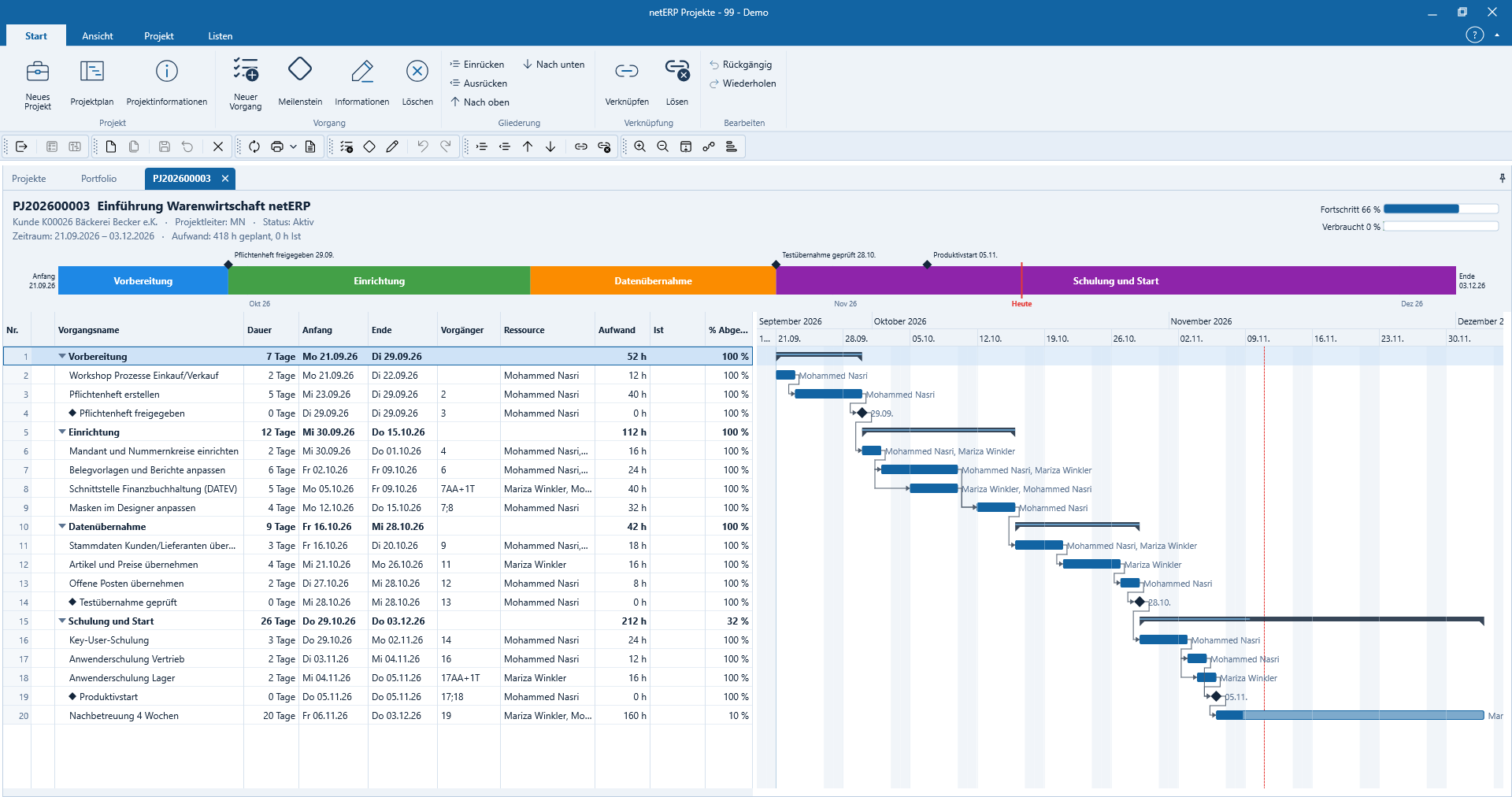
Phases, tasks, milestones, resources and progress are shown together in the Gantt chart and make dependencies immediately visible.
Project structureDivide initiatives into manageable phases and work packages.
ResponsibilityAssign tasks unambiguously to individuals or teams.
SchedulesTrack milestones, due dates and dependencies together.
LinksOpen customers, tickets, documents and activities in the project context.
In daily operations
An order becomes a controllable project workflow.
Project structure, work packages and schedules form the framework. Responsibilities and status make visible what is completed, where a decision is missing and which transactions belong to the project.
Create projects with customer, contact person and objective
Manage phases, work packages and milestones in a structured way
Assign responsibility, due date and status to tasks
Keep related tickets, activities and documents in the project context
Make progress and open decisions visible to the team
Actual application interface
How the module operates in netERP.
The screenshots show a fully synthetic test tenant. Clicking an image opens it at full size.
netERP · Project plan with timeline
Project plan with timelinePhases, tasks, milestones, resources and progress appear together in the Gantt chart and make dependencies immediately visible.Click image to enlarge
netERP · Project portfolio overview
Project portfolio overviewMultiple active projects are compared by effort, progress and timing in a consolidated portfolio view.Click image to enlarge
netERP · Plan resource utilization
Plan resource utilizationThe week view shows planned hours per resource and highlights overallocations before appointments or tasks are adjusted.Click image to enlarge
netERP · Alle Projektvorgänge filtern
Filter all project tasksWork packages from multiple projects can be searched and grouped by date, resource, effort, actual time, and progress.Click image to enlarge
netERP · Projektdaten und Partner verbinden
Connect project data and partnersProject lead, timeframe, customer, contact person, quote and service items remain directly linked to the project.Click image to enlarge
Typical workflow
From onboarding to a verifiable result.
1
Structure the project
Objectives, participants, phases and milestones are defined.
2
Allocate work
Work packages are assigned owners, dates and a clear status.
3
Manage progress
Open items and linked tasks remain visible within the project.