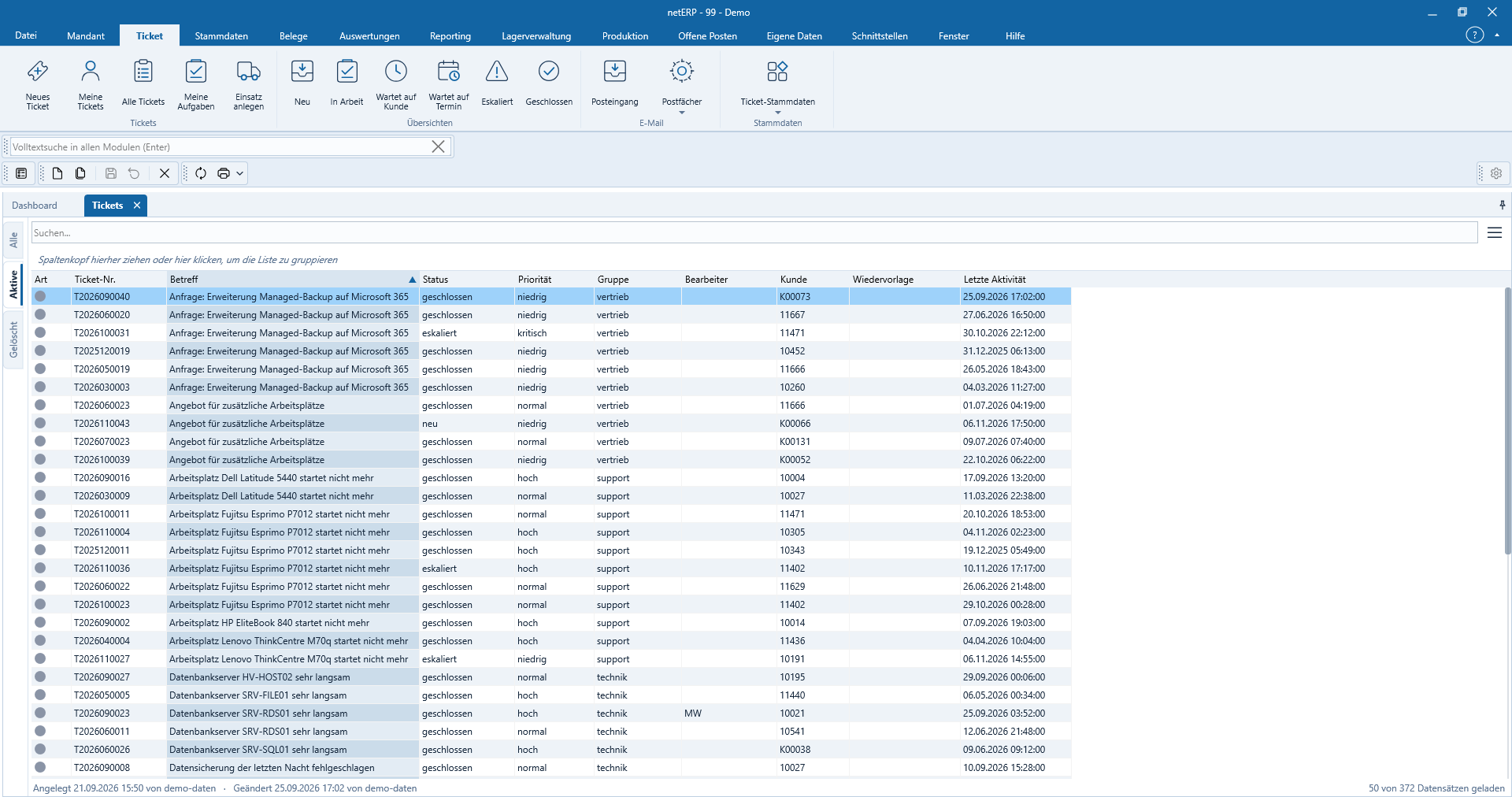
Ticketing system: emails become manageable service operations.
Requests from mailboxes, phone calls and service contracts end up in a single consolidated case. Replies, attachments, times and notes remain with the ticket instead of being split across separate tools.
Status, Priorität, Gruppe, Bearbeiter, Kunde und letzte Aktivität sind in einer durchsuchbaren und gruppierbaren Liste sichtbar.
Incoming emailNew messages generate tickets with sender and attachments.
Automatic assignmentReplies are routed back to the correct case via the ticket number.
Deadlines & SLAKeep priority, response time, resolution time and reminders visible.
Complete historyView emails, phone calls, notes and logged services together.
In daily operations
From the inbox to completed service.
netERP fetches IMAP mailboxes, creates tickets and reassigns subsequent replies to the correct ticket via the ticket number. Group, status, priority and deadlines make processing controllable.
Poll multiple IMAP mailboxes regularly and per group
Organize tickets by group, type, status and priority
Send replies with templates via the appropriate relay
Maintain deadlines, reminders and SLA references directly on the ticket
Transfer service entries from the ticket into subsequent documents
Real application interface
How the module works in netERP.
The screenshots show a fully synthetic test tenant. Click an image to open it full size.
netERP · Tickets as a worklist
Tickets as a worklistStatus, Priority, Group, Assignee, Customer and Last Activity are visible in a searchable and groupable list.Click image to enlarge
netERP · Get an overview of the complete process
Get an overview of the complete processStatus cards, messages, internal notes and service entries represent the prior history of the escalated demo ticket on one page.Click image to enlarge
netERP · Manage control data directly
Maintain control data directlyStatus, priority, group, assignee, customer, contact, follow-up and SLA deadlines are managed together on the ticket.Click image to enlarge
netERP · Automatically assign emails
Automatically assign emailsIncoming and outgoing messages with .example addresses remain readable in the ticket, including attachments and the ticket number.Click image to enlarge
netERP · Track changes
Track changesThe history logs creation, ownership transfers, status changes and deadline transitions of the ticket in chronological order.Click image to enlarge
Typical process
From entry to a traceable outcome.
1
Receive request
An email or phone call is recorded as a ticket and assigned.
2
Control processing
Group, responsible parties, status, priority and deadlines are maintained.
3
Document resolution
Responses and work entries remain fully preserved on the ticket.