Customizing masks with the Mask Designer
The Mask Designer works like a development environment in the style of Delphi — directly in netERP.
Opening the Designer
Click the gear in the top right of a mask or press F12. You need the permission to design masks for that.
Structure
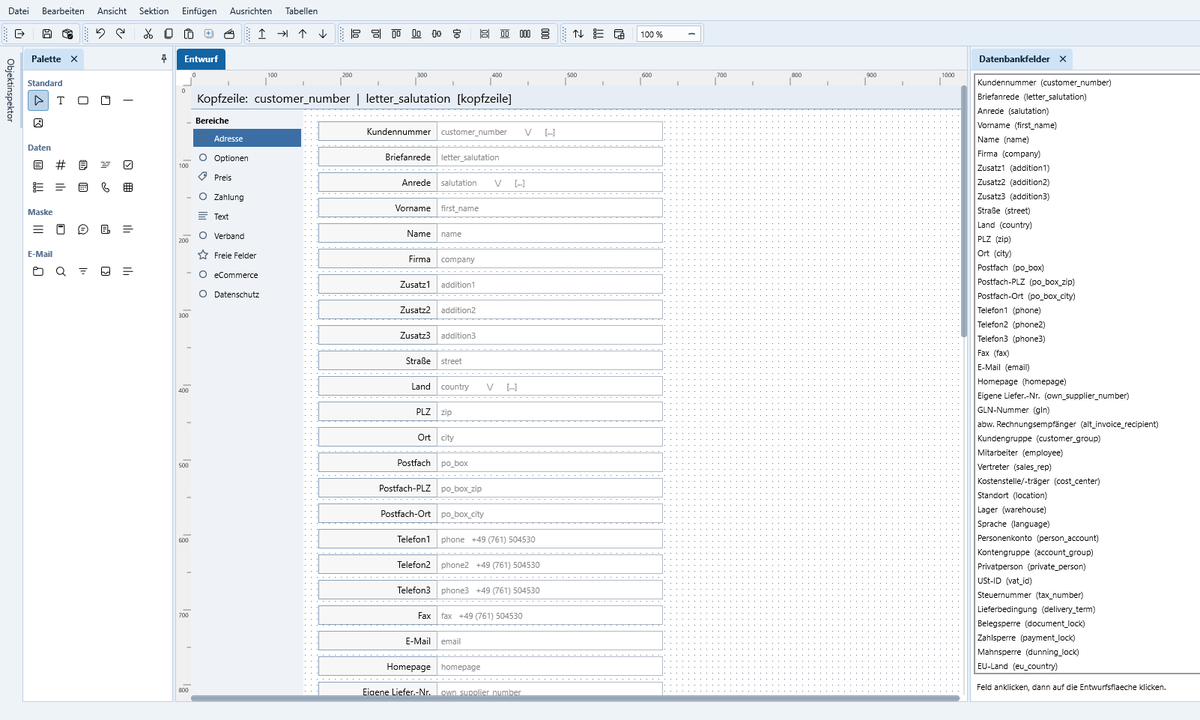
The Designer is a window with dockable areas: Design, Palette (Standard, Data, Mask, Email), Object Inspector, Object Tree (Shift+F11) and Database Fields. The layout can be saved, loaded and set by the administrator as the default for everyone.
Editing objects
- Drag fields from the palette or the list of database fields into the design.
- In the Object Inspector you set properties. Padding and margins show a shared value when collapsed, and each of the four sides individually when expanded. Under ‚Behavior‘ you make a field required or read-only. Right-click → Reset to default values.
- In the Object Tree you move objects into groups or tab pages by dragging; the substructure moves with them.
- Esc selects the parent object.
Tabs
A tab object divides the mask into pages. Right-click to add new pages, rename, remove or move them.
Saving and activating
Save creates a new, not yet active version. Save & activate makes it effective for all users of the tenant; other workstations adopt the change after about 20 seconds. Older versions can be found under Mask versions.