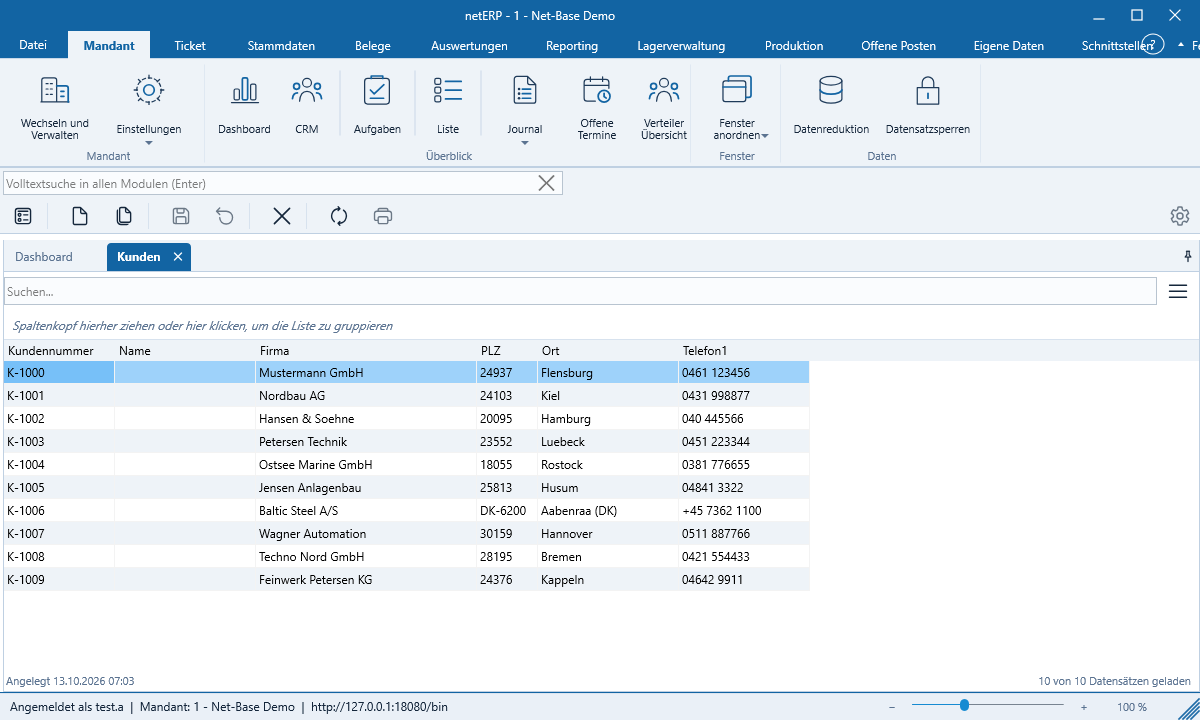
Lists, Search and Grouping
Lists load page by page and remain fast even with large data volumes.
Searching and sorting
The search field above the list (F3) searches the displayed columns. Clicking a column header sorts; clicking again reverses the direction. netERP loads additional rows as you scroll.
Choose columns
The button with the three lines opens the column selector: drag columns between „available“ and „displayed“ and set row height and font size. netERP remembers widths, order and sorting for you.
Grouping
- Drag a column header into the group bar above the list – or right-click the column and choose Group by „Column“.
- For additional levels, drag more columns. Date columns can be grouped by day, month or year.
- Each group shows counts and totals. Use + and − to expand and collapse groups; empty values appear as „(empty)“.
Full-text search
Ctrl+F jumps to the search bar under the ribbon. After pressing Enter netERP opens a „Search“ tab with results from all modules, presented as tiles. Clicking opens the record. You only see results from modules you have read access to.
Who is editing right now?
Records currently opened by a colleague are highlighted in color in the list.